Team Stores That Collect the Money for You
Open a team store, let every parent or employee pay for their own order online, and get one production order with the sizes added up. Payments go to your own Stripe or Authorize.net account.
Start your free 30-day trial · See pricing · Sign in
No credit card required. The app itself lives at pro.printshopcrm.com.
Forty parents. One coach with a spreadsheet. Checks that show up three weeks after the shirts do. If you print for teams you know the routine, and you know who ends up chasing the money.
A team store here is one link. Each person picks their item and size and pays for it on the spot. When the store closes you have one order with the sizes totalled and most of it already paid.
How it runs
You set it up once per team or company. After that the link does the work.
- Create a store, add the items and prices, and set a close date. Share the link by text, email or a QR code on a flyer.
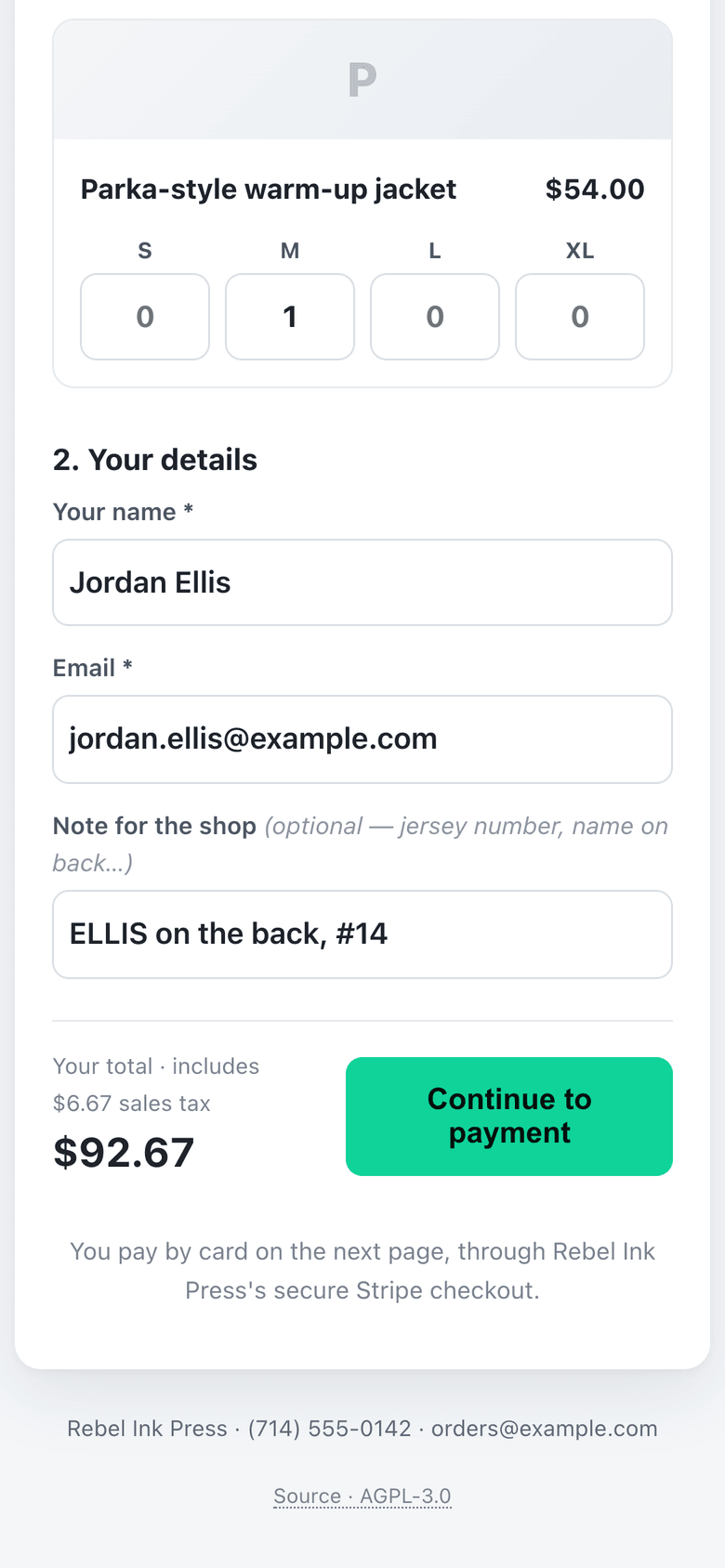
- Members choose item, size and quantity. There is a note field for a name or number on the back.
- With payment switched on, they see their total with sales tax and pay by card before the order counts.
- Somebody closes the tab halfway through? Their order is saved as unpaid, and you can copy a pay-later link to send them.
- After the close date the store stops taking orders. Orders already paid stay in.
Where the money goes
Into your account. Not ours.
- Payment runs through your own Stripe or Authorize.net. We take no cut of the transaction and add no platform fee.
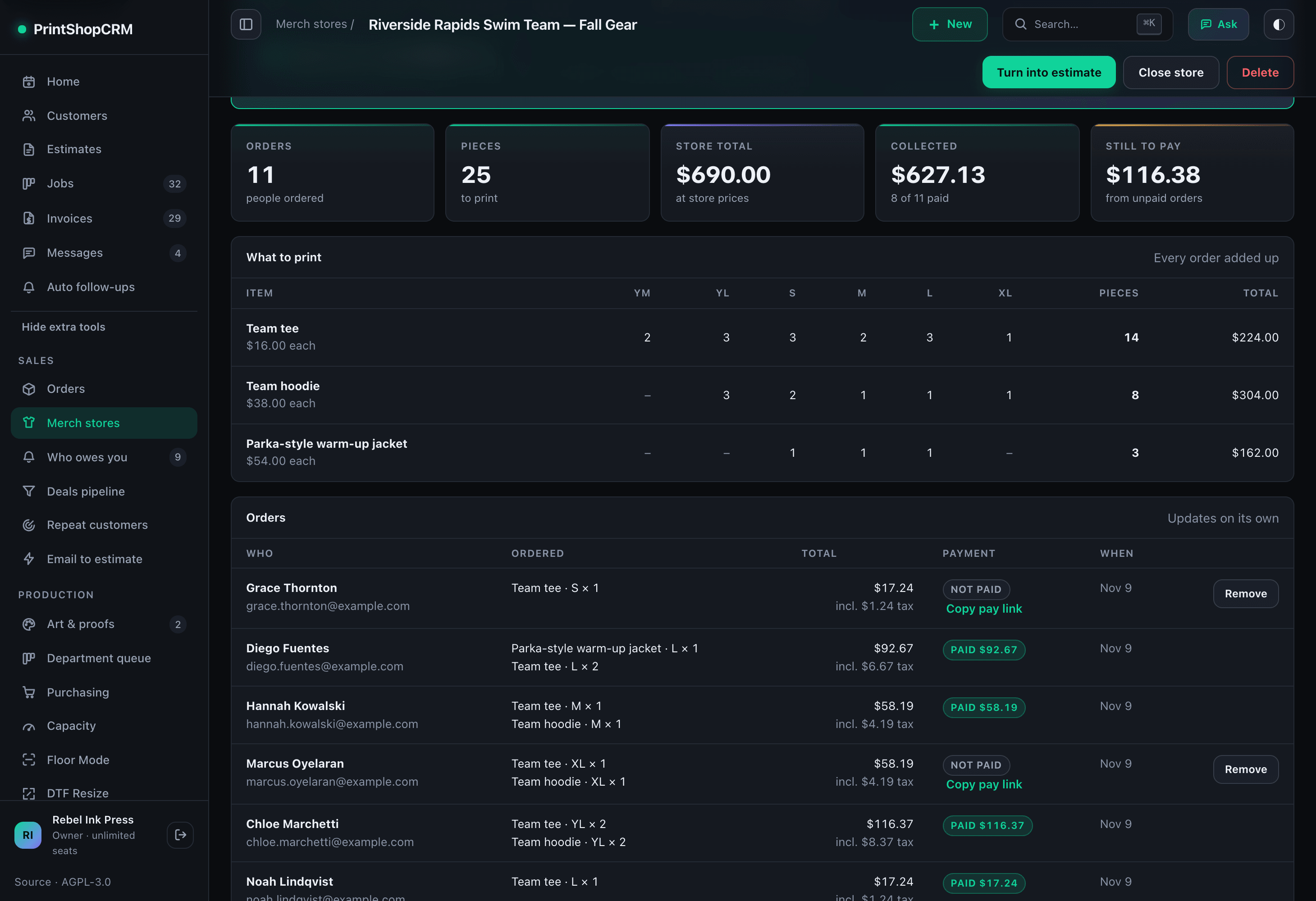
- The store screen shows who has paid, what has been collected and what is still outstanding.
- When you turn the store into an order, every prepaid member order posts to that one invoice as its own payment. The balance left is exactly what the unpaid members owe.
- A refund at your processor marks that order and flags the store so nobody ships against money that went back.
One job on the floor
Thirty-eight orders from parents are still one print run. Production sees it that way.
- The store rolls up into a single estimate with per-size totals, then one invoice and one job.
- No job is opened per member. Nobody on press has to work out that eleven tickets are the same design.
- The switch is per store and off by default, so a store you would prefer to invoice the school for works the way it always has.
What it does not do
Worth knowing before you promise a booster club something.
- There is no online designer. Members pick from the items you set up.
- Members do not get an emailed receipt yet. The order page they land on after paying is the receipt.
- You need Stripe or Authorize.net connected first. Without one, stores still collect orders and you bill afterwards.
Common Questions
Do you take a percentage of team store sales?
No. Payments go straight to your own Stripe or Authorize.net account at your own processing rate. The software adds no transaction fee.
What happens if a parent does not finish paying?
Their order is saved as unpaid. You can copy a pay-later link from the store screen and send it to them, or collect on the invoice with everyone else who has not paid.
Is sales tax handled on team store orders?
Yes. With payment switched on, each member is shown their total with sales tax at the rate for the store customer, or no tax if that customer is exempt, before they pay.
Does every team member become a separate job?
No. All of a store's orders roll up into one estimate, one invoice and one production job with the sizes totalled.
Can I run a store without taking payment online?
Yes. Payment is a switch on each store and it is off by default. With it off, the store collects orders and you invoice the team or school the usual way.