Shipping Labels Without Leaving the Job
Rate, buy and print a shipping label from the job it belongs to, on your own EasyPost account. Tracking saves to the order. A double click cannot buy two labels.
Start your free 30-day trial · See pricing · Sign in
No credit card required. The app itself lives at pro.printshopcrm.com.
The order is boxed. Somebody opens another tab, retypes the address from the invoice, buys a label, then pastes the tracking number back into the job. On a good day.
Here the label is bought from the job. The address is already there and the tracking number lands where the rest of the order lives.
From box to label
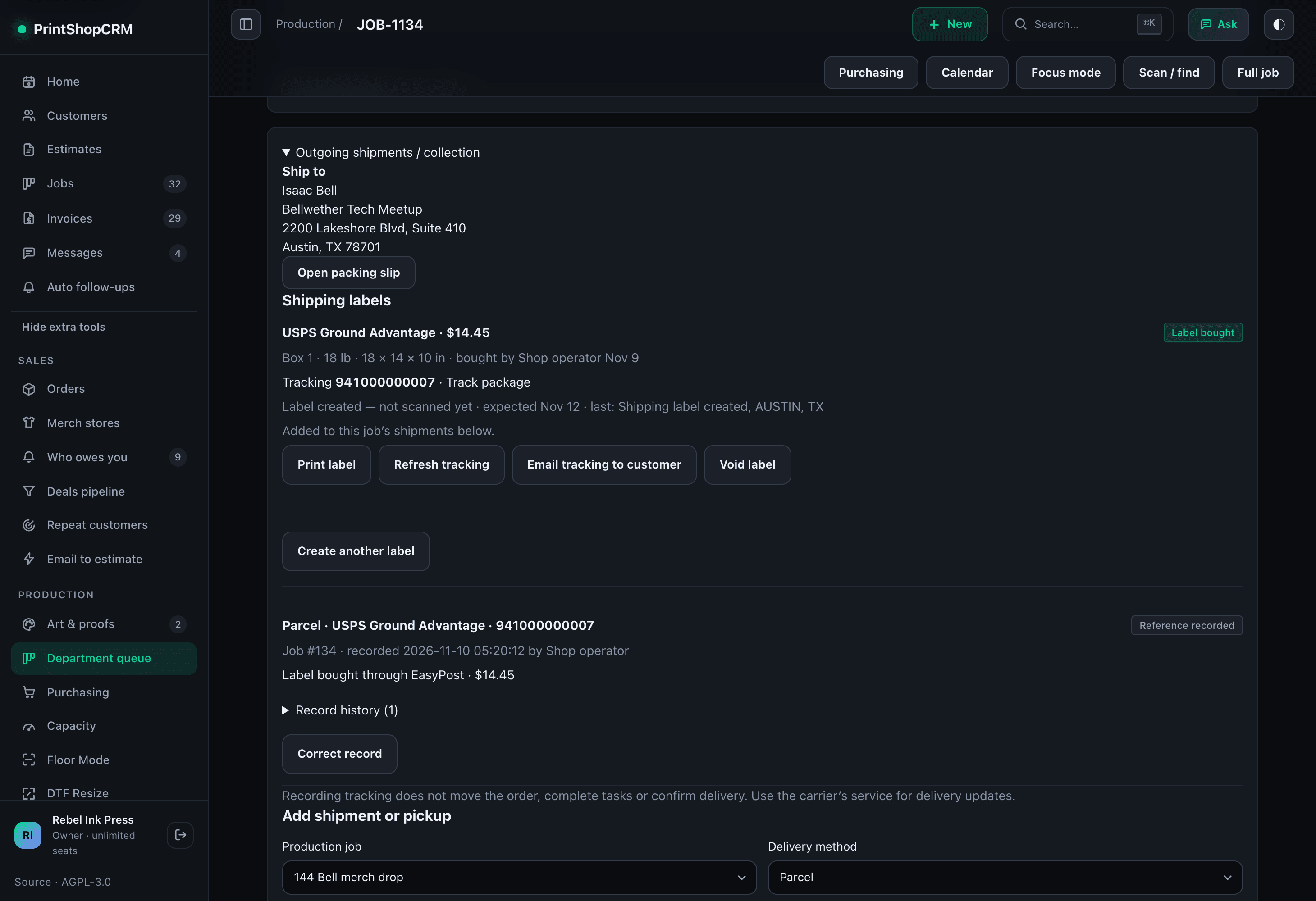
It happens on the job's shipments card, where you already record that something went out.
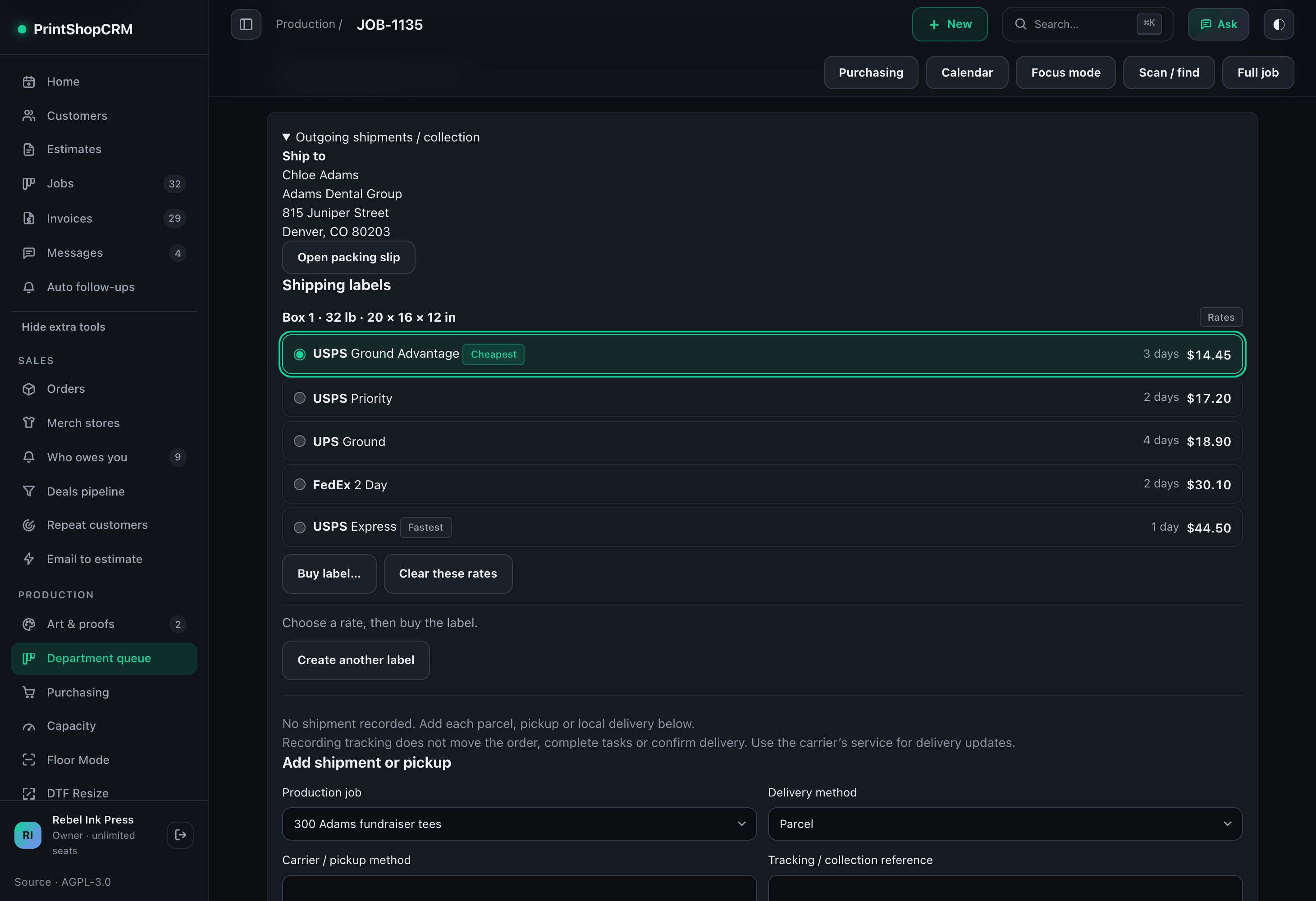
- The ship-to address is filled in from the order. You confirm it before anything is priced.
- Enter weight and size for each box. Three boxes means three labels, each with its own rate list.
- Rates come back with carrier, service, days and price. The cheapest and the fastest are marked.
- Buying asks you to confirm the price first, and says plainly that it charges your label account.
- Print a 4x6 label. Carrier and tracking number are saved to the job.
Your account, your rates
Labels are bought on your own EasyPost account. Nothing is added to the postage.
- One API key in Setup. It is stored on the server and never shown again in the browser.
- Your ship-from address and usual box size are saved so you are not typing them every time.
- Managers can buy labels. There is a switch if you want floor staff to buy them too.
It will not buy the same label twice
Shop wifi drops. People double click. Neither should cost you postage.
- Each box is claimed before the request leaves, so two clicks make one purchase.
- If the answer gets lost on the way back, "Check purchase" asks the carrier what actually happened. It never buys.
- Bought the wrong one? A manager can void it, which requests the refund from the carrier and keeps the history.
Try it without spending anything
Use an EasyPost test key first.
- Test labels are marked TEST on screen and across the printed page.
- They are not recorded as shipments and are never emailed to a customer.
- Swap in your live key when you are happy with how it works.
What it does not do yet
Domestic parcels from a production job. That is the scope.
- No customs forms or international paperwork.
- No return labels and no batch buying.
- The customer does not see shipment status in their portal yet. There is a button to email them the tracking link.
Common Questions
Which label provider does it use?
EasyPost, on your own account, which covers USPS, UPS, FedEx and the other carriers you enable there.
Do you mark up postage?
No. Labels are bought on your EasyPost account at your rates. The software adds nothing to the price.
Can a double click buy two labels?
No. The box is claimed before the purchase request is sent, and a lost response is checked with the carrier before anything is retried.
Can I test it without buying real postage?
Yes. With an EasyPost test key every label is a sample marked TEST, is kept out of your shipment records, and is never sent to a customer.
Does it handle international shipments?
Not yet. It covers domestic parcels. Customs forms, return labels and batch buying are not included.