Live Garment Stock, Right on the Quote
See your distributor's stock for every size while you write the quote. Flags sizes you cannot get, carries exact SKUs to the purchase order, and never blocks a quote when the supplier is down.
Start your free 30-day trial · See pricing · Sign in
No credit card required. The app itself lives at pro.printshopcrm.com.
You quote 144 in heather navy, the customer approves, you go to order blanks, and the 2XL is out until next month. Now you are on the phone talking them into charcoal.
The fix is boring. Check stock before you send the quote. So the quote screen does it for you.
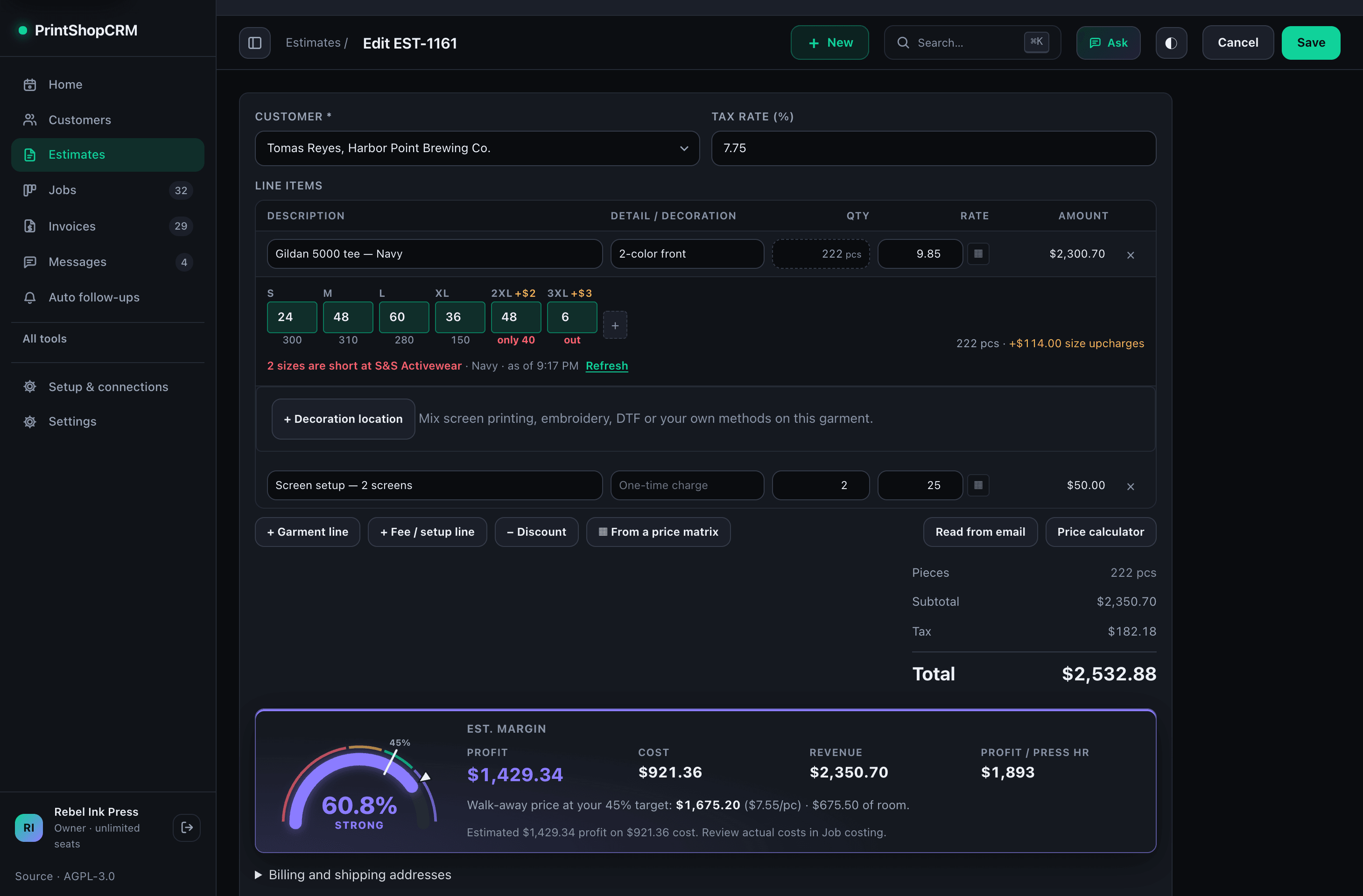
What you see while quoting
Type the style and colour on a line the way you already do. The stock shows up under the size boxes.
- A count under each size, "low" when it is thin, "out" when there is none.
- Any size where the quote asks for more than the distributor has is flagged in red, with the number they do have.
- A line that says where the number came from and when it was read, with a Refresh button.
- It works in the full estimate editor and in the guided estimate, on a phone as well as a desktop.
It uses your own distributor account
Connect S&S Activewear, SanMar or alphabroder once in Setup with your own credentials.
- Lookups are cached for ten minutes per style so a busy morning of quoting does not hammer your account.
- If the distributor is slow or down, the quote still saves and sends. You just do not get the stock line.
- Not connected? One quiet line tells you so and links to Setup. Nothing else changes.
The purchase order gets the exact SKUs
Once a line is matched to the distributor, the SKU for each size and colour is saved with it.
- Those SKUs ride from the quote to the job to the purchase order, so the PO lists what to order line by line.
- Receiving against the PO is per size, with partial receipts and short closes.
- Placing the order is still yours to do in the supplier's portal. The software does not buy garments on its own.
Your own blank costs
Stock is only half of buying blanks. The other half is knowing what they cost you.
- The blank catalog is editable. Add the styles you actually buy and put in your real price.
- Your price outranks the built-in estimate for the same style.
- Every job's profit card says where its blank cost came from: live from the distributor, your price, a catalog estimate, or an approximation because the style is not in your catalog.
Common Questions
Which distributors does live stock work with?
S&S Activewear through its own API, and SanMar and alphabroder through their PromoStandards inventory service. Each uses the account credentials you enter in Setup.
Does it place the garment order for me?
No. It builds the purchase order with the exact SKUs and quantities and tracks receiving. You place the order in your supplier's portal.
What if my distributor's system is down?
Quoting carries on. Stock lookups fail quietly and the quote saves and sends as normal.
Is the stock number per warehouse?
It is the total the distributor reports for that style, colour and size. It is a go or no-go check while quoting, not a warehouse picker.
Can I use my own negotiated blank prices?
Yes. Add or correct any blank in the catalog and your price is used for costing ahead of the built-in estimate.